Bills
Bills is an optional, self-contained tracker for spends that are not part of your shared monthly budget and are never settled between members: fuel, transport, recharges, utility bills (gas, electricity, water), rent, credit-card bills, and the like. It is pure record-keeping, with its own categories, history, and analytics, and it never affects your budget, settle, or meal-card screens.
Turning it on
Bills is off by default. To enable it:
- Open Settings -> Bills.
- Turn on Enable bills.
A new Bills tab appears in the tab bar. Turning it off again hides the tab; your data is kept and reappears if you re-enable.
Categories
Bills has its own category set (separate from your budget categories), pre-filled with common ones like Fuel, Rent, Electricity, and Recharge. Manage them under Settings -> Bills -> Manage categories: add a new category, or long-press one to remove it.
Logging a bill
On the Bills tab, tap the + button, then enter the amount, pick a category, set the date, and add an optional note. Tap an existing entry to edit or delete it.
The Bills tab
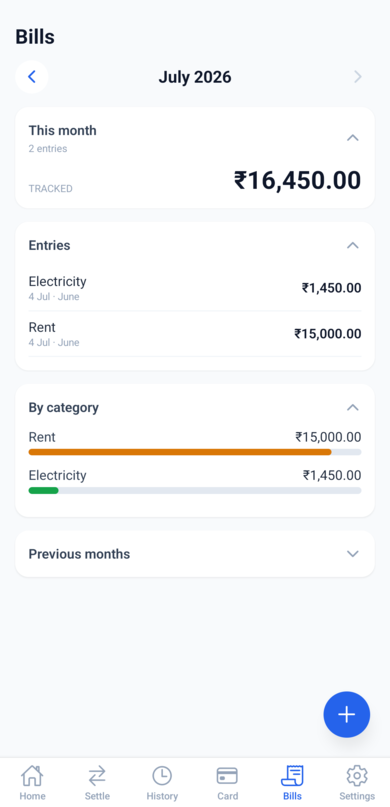
Use the month switcher at the top to move between months. The tab is organised into collapsible cards (tap a card's header to expand or collapse it):
- This month - the total you have tracked and the number of entries.
- Entries - every bill logged in the selected month; tap one to edit it.
- By category - each category's total and its share of the month, as a bar.
- Previous months - the last few months' totals; tap a month to jump to it.
What Bills does not do
- No budgets, limits, or alerts. It is tracking only.
- No splitting or settlement between members.
- Nothing here counts toward your household budget.