The home screen
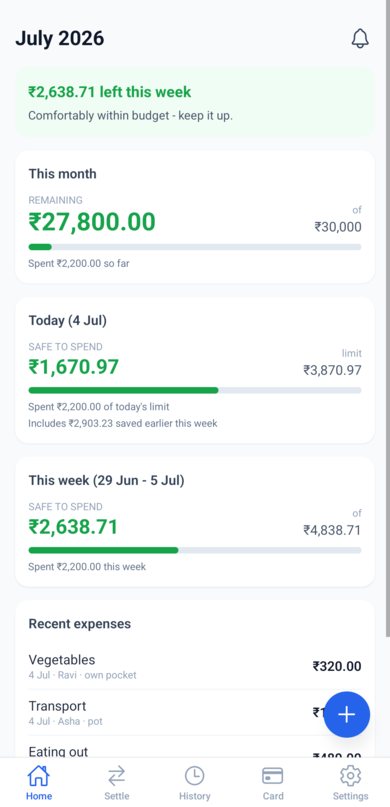
The home screen is your daily dashboard. Everything on it is calculated from the monthly budget and the expenses everyone has logged.
The notification bell
The bell in the top-right corner opens your notifications - every expense added, changed, settled, or budget warning from the household lands here. A red count on the bell means there's something unread.
WeSpend also warns the whole household when the month's shared-pot spending crosses 80% of the budget, and again if it goes over budget. These arrive as notifications, so you find out the moment a spend tips you over the line rather than the next time you open the app.
The banner at the top
The colored banner tells you at a glance how the current week is going - how much is left (green), that you're right on budget (grey), or that the week has run over (amber). It comes with a short nudge to keep you going.
This month
The big number is what remains of the monthly budget. The bar below shows how much of the month's budget has been spent so far, by everyone in the household combined.
Today
Today's limit is your share of this week's budget, adjusted by how the week has gone so far:
- Each day starts from an equal share of the week's available budget.
- Overspend today and tomorrow's limit drops by the excess (limit 500, spend 600 - tomorrow becomes 400).
- Underspend and tomorrow's limit grows by what you saved.
- Every Monday the day-to-day carry resets onto the new week's budget.
The card shows what's still safe to spend today, and a note when earlier days of the week have raised or lowered today's limit.
This week
Weeks run Monday to Sunday. Each week gets a budget (daily limit x days of that week in this month), plus or minus whatever carried over from last week:
- Spend less than last week's budget and the leftover is added to this week.
- Overspend and the shortfall is deducted from this week.
The "carried from last week" line shows that adjustment. Carry-over only happens within a month - every new month starts fresh.
Recent expenses
The latest expenses from everyone in the household. Tap one to view, edit, or delete it. The grey line under each shows the date, who spent it, and whether it came from the shared pot or someone's own pocket (that distinction matters for settling up).
How many entries show here is up to you - set it under Settings -> Appearance -> Recent expenses to show (5, 8, 10, 15, or 20). To dig deeper than the recent list, use the search on the History tab.
The + button
The blue button in the corner logs a new expense - see Logging expenses.
The month recap
When a new month begins, the first time you open WeSpend it shows a short recap of the month just gone - total spent, whether you spent more or less than the month before, and your top category and spender. You can revisit any month's recap later from the History tab.