Meal card
If someone in the household uses a prepaid meal card (a Sodexo/Pluxee-style food wallet, or any card you load money onto and spend down), WeSpend tracks it on its own Card tab. Card spends are kept completely separate from your household budget and are never settled between members - the card is its own pot of money with its own balance.
How it's different from the budget
- It carries over. Unlike the monthly budget, the card balance rolls from one month into the next. There's no monthly reset - money you don't spend this month is still there next month.
- You top it up, it doesn't refill. When you recharge the card in real life, add the same amount as a top-up so the app's balance matches.
- It's outside the budget. A card spend never touches your daily/weekly limits, your shared pot, or settlement. It only moves the card balance.
Setting it up
- Open Settings -> Meal card.
- Enter the current balance on your card and, optionally, a low-balance warning amount.
- Tap Set up meal card.
The Card tab then shows your balance and spends. You can turn the card off later from the same settings screen (Card enabled); your data is kept.
Logging a card spend
On the Card tab, tap the + button. It opens the normal add-expense form already set to come out of the card, so just enter the amount, category, date, and an optional note. The spend is deducted from the card balance and listed under "Card spends this month" - it does not appear in your budget totals.
The Card tab
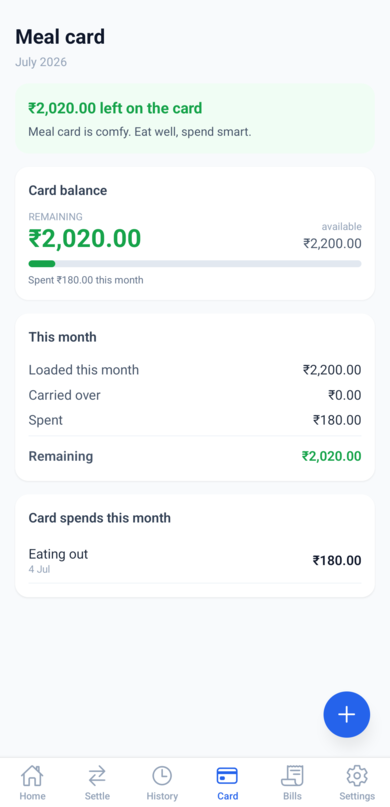
- Balance banner - a green/amber/red line telling you at a glance whether the card is healthy, running low, or overdrawn.
- Card balance - what's remaining out of what's available this month, with a bar for how much you've spent.
- This month - the breakdown: loaded this month, carried over from last month, spent, and remaining.
- Card spends this month - every card purchase in the selected month; tap one to edit it. Use the month switcher to look back.
Top-ups and the low-balance warning
- Top up - after recharging the card, open Settings -> Meal card -> Top up, enter the amount, and it's added to the balance.
- Low-balance warning - set a threshold (or
0to turn it off) under Settings -> Meal card. When a card spend drops the balance below it, everyone in the household gets a notification so a recharge doesn't get forgotten.